
Public transport in Vilnius
Public transport in Vilnius can feel tricky at first, even for locals who usually drive and only occasionally hop on a bus or trolleybus.
But it’s not as complicated as it looks.
Like many other things in Vilnius, the public transport system is digital. You can check routes on your phone from pretty much anywhere, which makes getting around the city much easier.
Information at bus stops and on board is usually clear, too. Screens show what’s coming next and announcements help you stay on track.
You just have to follow the signs, the screens and the small cues locals rely on without thinking.
I’ve lived in Vilnius for almost 20 years and use the system often enough to know where visitors usually get confused: tickets, validation, route colours and which public transport app to choose. Here’s the practical version I’d give to a friend visiting the city for the first time.
I base my recommendations on my own experience using public transport in Vilnius, so I focus on what is practical rather than listing every possible ticket or rule.
Public transport in Vilnius at a glance
Vilnius mainly runs on buses and trolleybuses.
There are a few kinds of buses:
- Regular buses: the default option for most routes.
- Express buses: they do not stop at every stop, so they can save time.
- Night buses: limited routes for late hours.
- Event routes: special services that appear during big events and take people from residential areas to the venue.
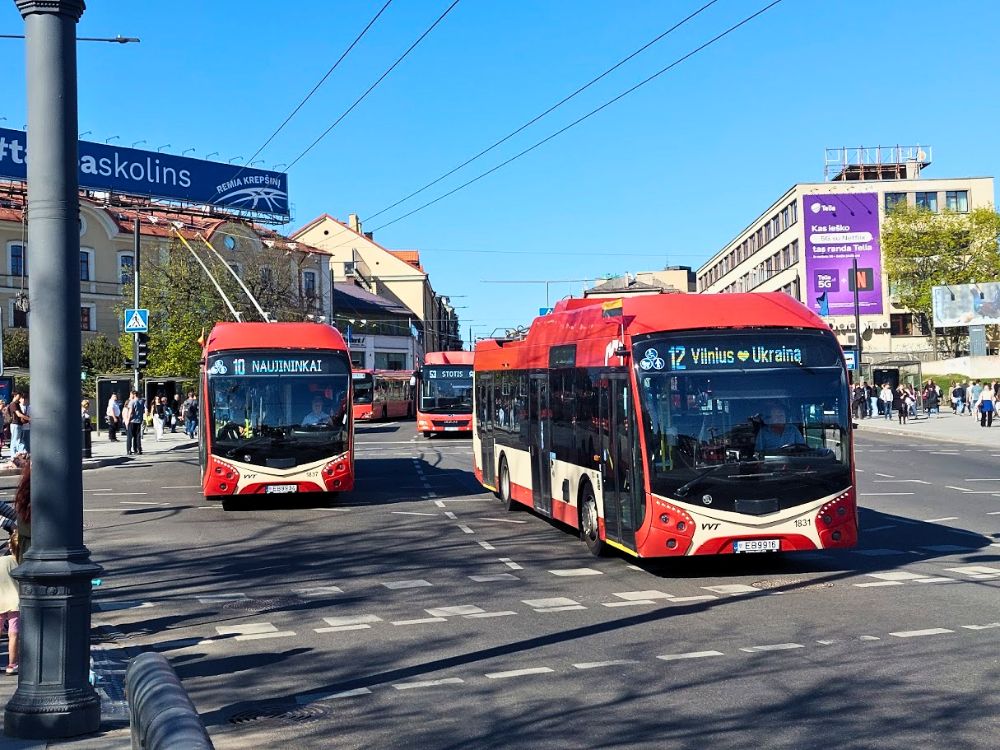
Trolleybuses overlap with buses in some areas, and some bus and trolleybus routes share the same number, which can be confusing at first.
The easiest fix is to rely on the app and stop screen, not just the number.
There are also boats. In my mind, they sit somewhere between transport and a small city experience. They’re scenic and fun, and they can make a nice warm-day plan if you want to see the city from the water. For everyday travel, they’re not the fastest or the cheapest option.

If you’re in a hurry, taking a bus or trolleybus is usually faster, though walking can sometimes be quicker too. Still, it’s worth knowing they exist, especially because some tickets can include boats together with buses and trolleybuses.
Tickets first: how to buy one
For most visitors, these are the ticket types that actually matter:
- 30-minute ticket: €1.00
- 60-minute ticket: €1.25
- 1-day ticket: €7.50
- 3-day ticket: €13.50
These are the prices I currently see in the ticket apps and use myself in Vilnius; you can also check the official ticket types and prices on the JUDU website if you want the full overview.
If you’re wondering which one you’ll use most, it’s the 30-minute ticket.
For most central or inner-city trips, a 30-minute ticket is enough. I usually only choose 60 minutes when crossing longer distances, travelling from the edge of the city or taking a route with a longer transfer.
If you’re travelling as a small group, two options can be worth checking:
- Family ticket 2+3 (30 min): €2.10 (up to two adults and up to three kids)
- Group tickets exist too, and the full list is easiest to see inside the apps
Boat-related tickets exist as well:
- A ticket that covers bus + trolleybus + boat within 90 minutes from activation: €3.00
- A 90-minute family ticket (up to two adults and up to three kids): €7.00
- A “there and back” boat option that is basically two 90-minute boat-inclusive tickets in one, priced cheaper than buying two separately: €5.00
The second ticket appears automatically after the first expires and needs to be used by the end of the day.
If you’re visiting, boats are best treated as optional. The boat tickets are useful when you already planned to try the boat and you want it integrated into the same public transport system.
1) Buy tickets in an app
There are now three local apps connected to Vilnius public transport:
- JUDU: the new official app for tickets, route planning and parking
- Trafi: the one I use day-to-day for planning and for buying tickets
- m.ticket: the older official ticket app, still available during the transition to JUDU
JUDU is expected to replace m.ticket and m.parking in the future. At the moment, all three apps still work, and there is no confirmed date for when the older apps will be discontinued.
Tickets sync between all three apps. This means you can buy a ticket in JUDU or m.ticket, then open and use it in Trafi.
Buying tickets in Trafi
I personally buy my tickets in Trafi because I use public transport regularly and know I will use the remaining tickets later.
The main thing to know is that Trafi has a €5 minimum purchase. If you only need one or two tickets and know you will not spend €5, another app will make more sense.
There is also one thing to keep in mind with Trafi. It does not have a normal shopping cart where you can combine several ticket types in one purchase.
For example, if you want ten 30-minute tickets and one 60-minute ticket, you need to buy the two ticket types separately. You could buy the 30-minute tickets in Trafi, then buy the single 60-minute ticket in JUDU or m.ticket. Another option is to tap your bank card on board when you need the 60-minute ticket.
Buying tickets in the JUDU app
JUDU lets you buy tickets one at a time, which gives it an advantage over Trafi for visitors who only need a few rides. For buying only one or two tickets, JUDU is the more practical choice. For my own everyday use, I still prefer Trafi because I already know I will use the tickets I buy there.
The app has a clean, modern design. It also shows how much time is left on your active ticket directly on the main screen.
In Trafi, the remaining validity time is shown in a separate part of the app. I have missed it before, especially when my 30-day ticket was close to expiring.
Once, I did not notice that my ticket had already expired. Ticket inspectors boarded during the ride, and I had to buy a €15 control ticket.
You can protect the JUDU app with biometric login. This adds extra security, but when I used fingerprint protection, it also added a few seconds before I could access the app.
Buying tickets in m.ticket during the transition
m.ticket is the older official ticket app and is still available to download and use while Vilnius transitions to JUDU.
It can still make sense if you already have it installed, are used to it and do not want to change anything. However, if you are choosing between m.ticket and JUDU as a new user, I would pick JUDU. It offers more features and still lets you buy individual tickets without Trafi’s €5 minimum purchase.
If you already use m.ticket, you do not lose access to your tickets because they remain available across the connected apps.
One more thing to know is that m.ticket does not have an English interface. It can also be particular about internet access and may ask you to turn off Wi-Fi and use mobile data instead.
Payment options in the apps
You can pay by bank card or Revolut. Lithuanian online banking is also available, but it is unlikely to be useful for most visitors. If you are using a foreign bank card, it is worth completing the payment setup before you need to board.
2) Tap your bank card on board
You can buy a ticket directly on the bus or trolleybus by tapping:
- a physical bank card
- your phone
- your smartwatch
It’s fast, and it’s great as a backup.
The downside is that on board you’re buying a 60-minute ticket, even if you only need one stop.
You cannot buy a ticket from the driver with cash, so have one of these ready before boarding: an app ticket, a JUDU card or a bank card / phone / smartwatch for contactless payment.
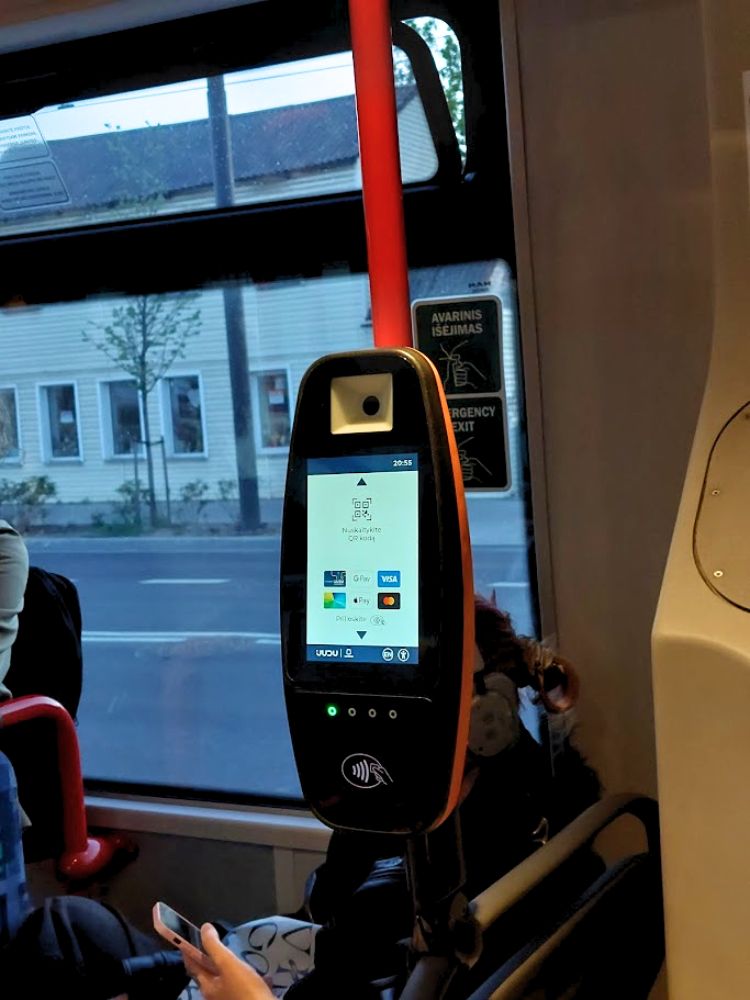
3) Get a physical JUDU (Vilniečio) card if you prefer not using your phone
If you do not want tickets living on your phone battery, there’s the JUDU (Vilniečio) card.
The card itself costs €1.50.
You can buy and top it up at JUDU customer service centres, plus many supermarkets and kiosks around town.
You can also top it up online.
Find your route: Trafi or JUDU?
For route planning, I still prefer Trafi.
I have used it for years, so I’m used to its simple interface and how quickly I can find the information I need. Saved addresses such as home or work appear directly on the main screen, so I can tap one and immediately see the best routes.
In JUDU, you first need to tap “Enter destination”, then choose one of your saved addresses from the list. The keyboard opens automatically, which can hide some of the saved locations. You may need to close it before you can see the full list.
It only adds a few seconds, but when you use an app every day, small extra steps can become frustrating.
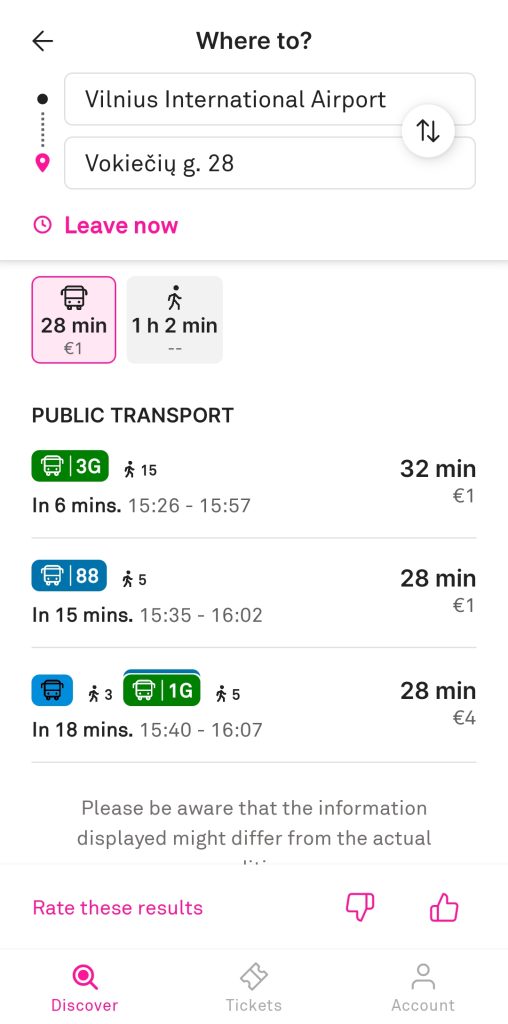
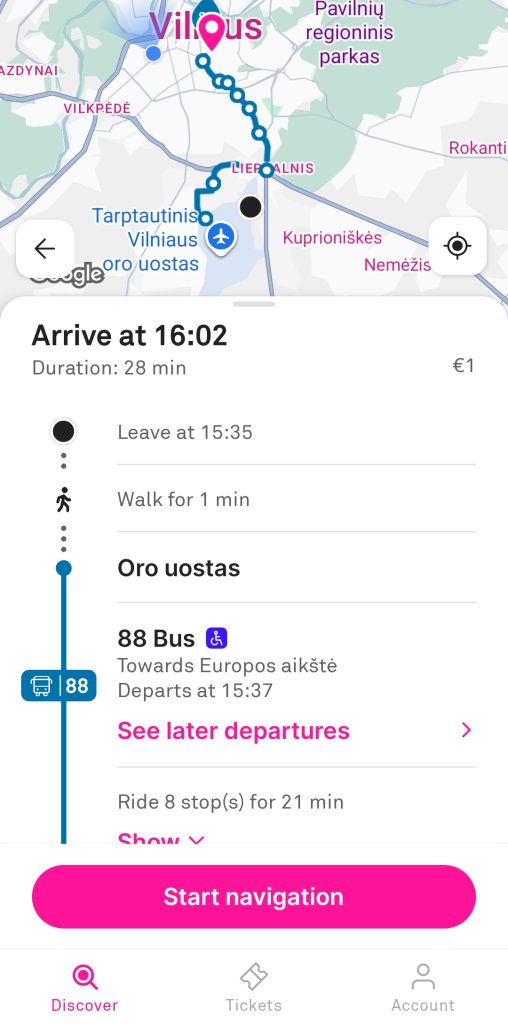
Both Trafi and JUDU have interactive maps where you can see buses and trolleybuses moving in real time. JUDU looks modern and clean, but Trafi still feels faster and easier to me when I want to find a route quickly.
One feature I like in JUDU is that it suggests routes not only by public transport or on foot, but also by bicycle. Trafi currently focuses on public transport and walking.
I keep Google Maps as a backup. It can get you from A to B, and it may be enough if you already use it for everything else. I still trust Trafi more for Vilnius public transport and prefer the routes it suggests.
Moovit and Citymapper can work too if you already use them elsewhere, but I do not use them in Lithuania.
If you prefer not to download another app, you can also check routes and timetables on the stops.lt website. It includes a trip planner, stop information and public transport routes, so it works as a useful browser-based alternative.
Read more: How to get from Vilnius Airport to Old Town
How to tell what’s what in apps
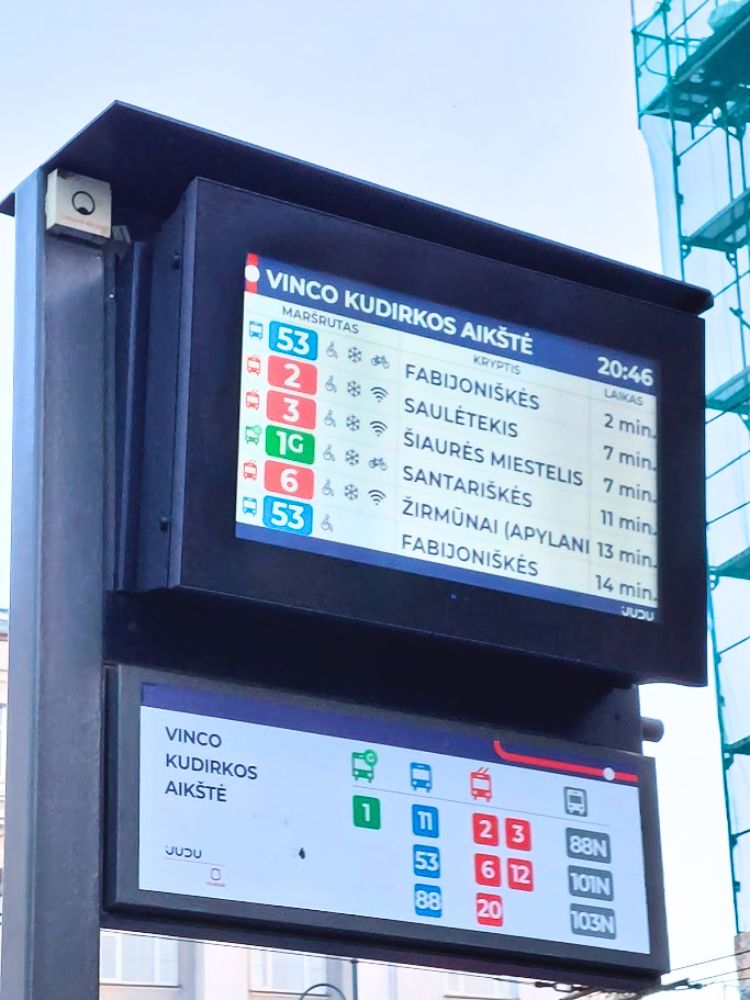
Here is how to recognise buses and trolleybuses by their numbers and colours in the apps and on stop screens:
- Regular buses show as a blue number (example: 53)
- Express buses show as a green number and always include G (example: 1G)
- Trolleybuses show as a red number (example: 6)
- Night buses show as a black number and include N (example: N5)
- Event routes show as purple and include R (example: 177R)
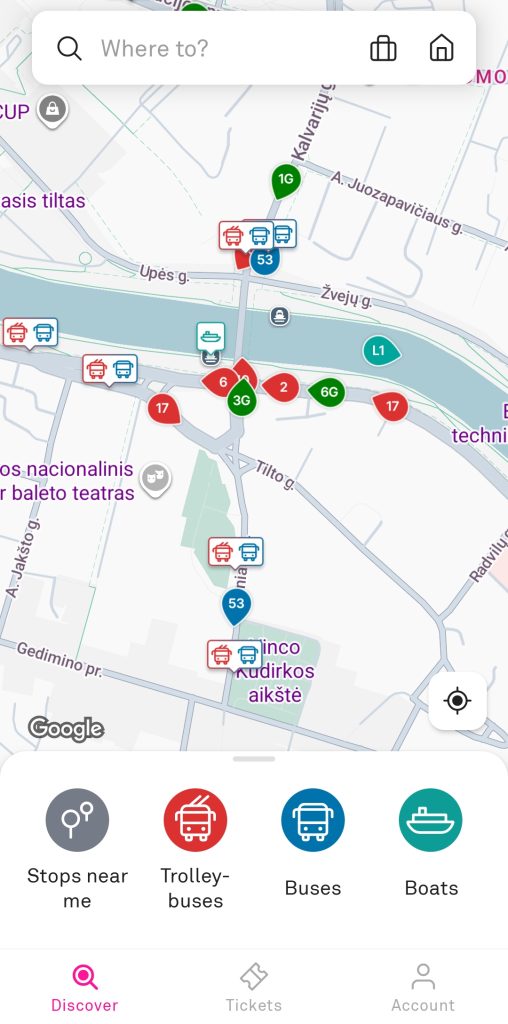
Because some bus and trolleybus numbers overlap, the colour and letter are your best clue, not just the number. This is one of those details locals stop noticing, but it can save you from boarding the wrong vehicle when you’re new to the system.
At the stop: real-time info that helps
At many stops, though not all of them, you’ll see an electronic screen with:
- the route number
- the direction
- minutes until arrival
It updates in real time. If a vehicle is delayed, the minutes adjust, so you’re not left guessing whether it’s actually coming.
Many stops also have a printed timetable on the pole. It’s usually a plastic holder with a sheet that lists all buses and trolleybuses that stop there, plus their scheduled departure times.
It’s a good fallback if there’s no electronic screen nearby or your phone is dead, but keep in mind it shows the planned timetable, not real-time arrivals.
One small but useful detail: because some buses and trolleybuses share route numbers, the stop screen and Trafi help you confirm what is arriving, not just “a 10”.
Boarding and validation: how to mark your ticket
In Vilnius, your ticket needs to be validated, which basically means activated.
Buying a ticket is not enough if it’s still sitting unused in your app or on your card. Validation is what starts the timer on time-based tickets and it’s also what inspectors check when they board.
If you validate too late, it can look like you only activated it after the check started, so it’s worth making validation part of your routine.
Validating in the Trafi, JUDU or m.ticket app
You choose the ticket you already bought, then tap to validate.
After a few seconds, it switches to an active state and you’ll see a timer running.
If you need to validate more than one ticket, you can do it in the app, but it’s one by one. Validate the first ticket, wait until it activates, then validate the next.
Timing is flexible. I usually validate once I’m inside. If you want zero stress, validate right before you board.
Validating with a physical JUDU (Vilniečio) card
You tap your card on the on-board validator. If there are multiple ticket types on your card, the screen asks you to pick which one to activate, then you tap again.
When you hear the signal and see validity info on the screen, you’re good.
Buying with a bank card on board
If you buy by tapping your bank card, phone, or watch, that tap is the purchase and the proof.
There’s nothing extra you need to do.
What it’s like on board
Most buses and trolleybuses have:
- screens showing upcoming stops
- audio announcements for the next stop
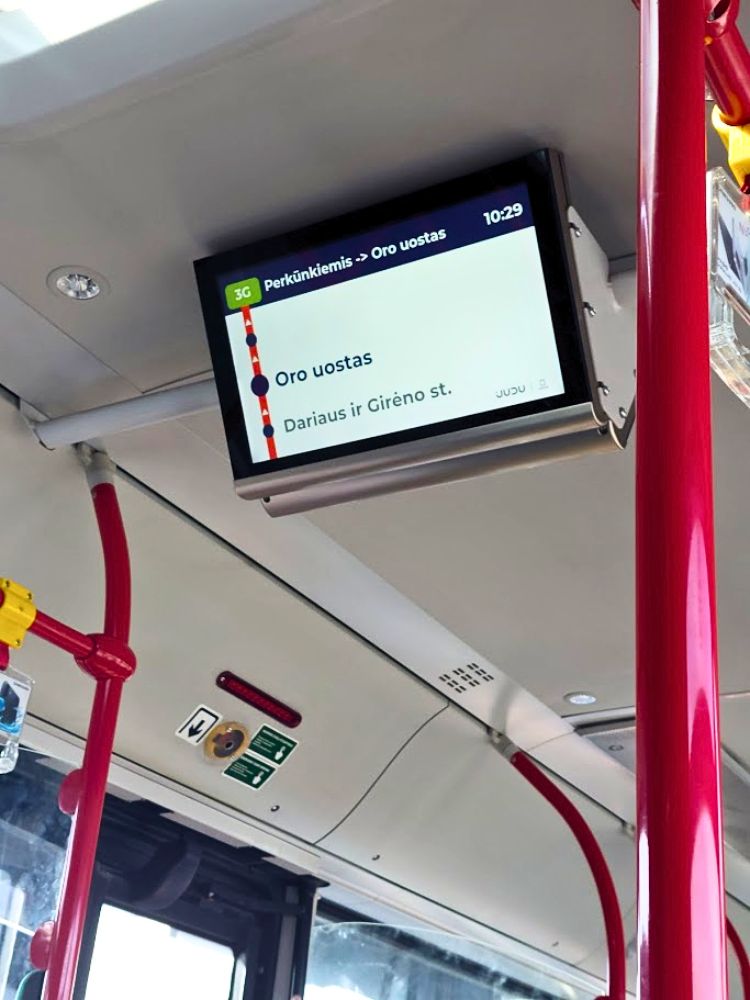
It makes rides easy even if you do not know the city.
A quick note about trolleybuses: they often have the antennas on top, but newer ones can briefly drive without them. So if you’re unsure, trust what the app and stop screen say.
Bus etiquette in Vilnius
A few small habits make rides smoother:
- People often try to sit rather than stand when seats are available.
- If you’re standing, it’s better to move into the middle instead of blocking doors. When people board at the next stop, they need space to step in.
- When you sit, it’s polite to take the window seat so someone else can sit next to you easily.
And yes, sometimes someone sits on the outer seat and leaves the window seat empty. Technically you can ask. Realistically, I get why you might not want to. If the ride is short, I sometimes just stand because I do not always feel like asking the person to move.
Ticket inspections: what happens when inspectors board
Ticket checks happen, so it’s worth knowing how it works.
When inspectors board, the on-board validators can become unavailable, which means you cannot suddenly activate a ticket on the validator.
What you show depends on how you bought your ticket:
- App ticket: there’s a “prepare for inspection” option that brings up a QR code, which they scan.
- Bank card / phone / watch: you use the same card or device you used to buy the ticket so inspectors can verify the purchase.
- JUDU (Vilniečio) card: same idea, they check the card.
If you paid with a phone or smartwatch, make sure you use the same virtual card you tapped on the validator.
If you activate an app ticket only after inspectors are already on board, they can see the activation time, so it can still cause problems.
If you do not have a valid ticket, there is an on-the-spot option called a control ticket:
- it costs €15
- paid by bank card (including phone or watch)
- valid for 2 hours
- lets you continue the ride without getting off
If you do not buy the control ticket, you can be asked to leave the vehicle and deal with a fine.
Final thoughts on public transport in Vilnius
Public transport in Vilnius gets easier once you know the few details locals rely on without thinking. Use Trafi to plan your route or try JUDU if you prefer the newer official app. Check whether a 30-minute ticket is enough, validate before or right after boarding and look at the route colour and letter, not just the number.
The system may feel confusing on the first ride, but the apps, stop screens and on-board announcements do a lot of the work for you. After a couple of trips, it stops feeling like something you need to decode and starts feeling like a normal part of moving around Vilnius.
Once getting around feels clearer, read my 2 days in Vilnius itinerary to see how you can plan your time in the city.
The free mini guide below is made for first-time visitors who want the main Vilnius planning tips in one simple place.
